 Wiki
Wiki
alchemist · alchemist-buttons-and-shortcuts
Buttons and shortcuts in Alchemist
This page describes buttons and shortcuts in Alchemist.
Buttons and shortcuts in Alchemist
Shortcuts
- CTRL+S: Saves current project
- CTRL+SHIFT+S: Saves current project as a new file
- CTRL+C: Copy selected animations
- CTRL+V: Save selected animations
- CTRL+Q: Attempt best-fit columns to screen
Buttons
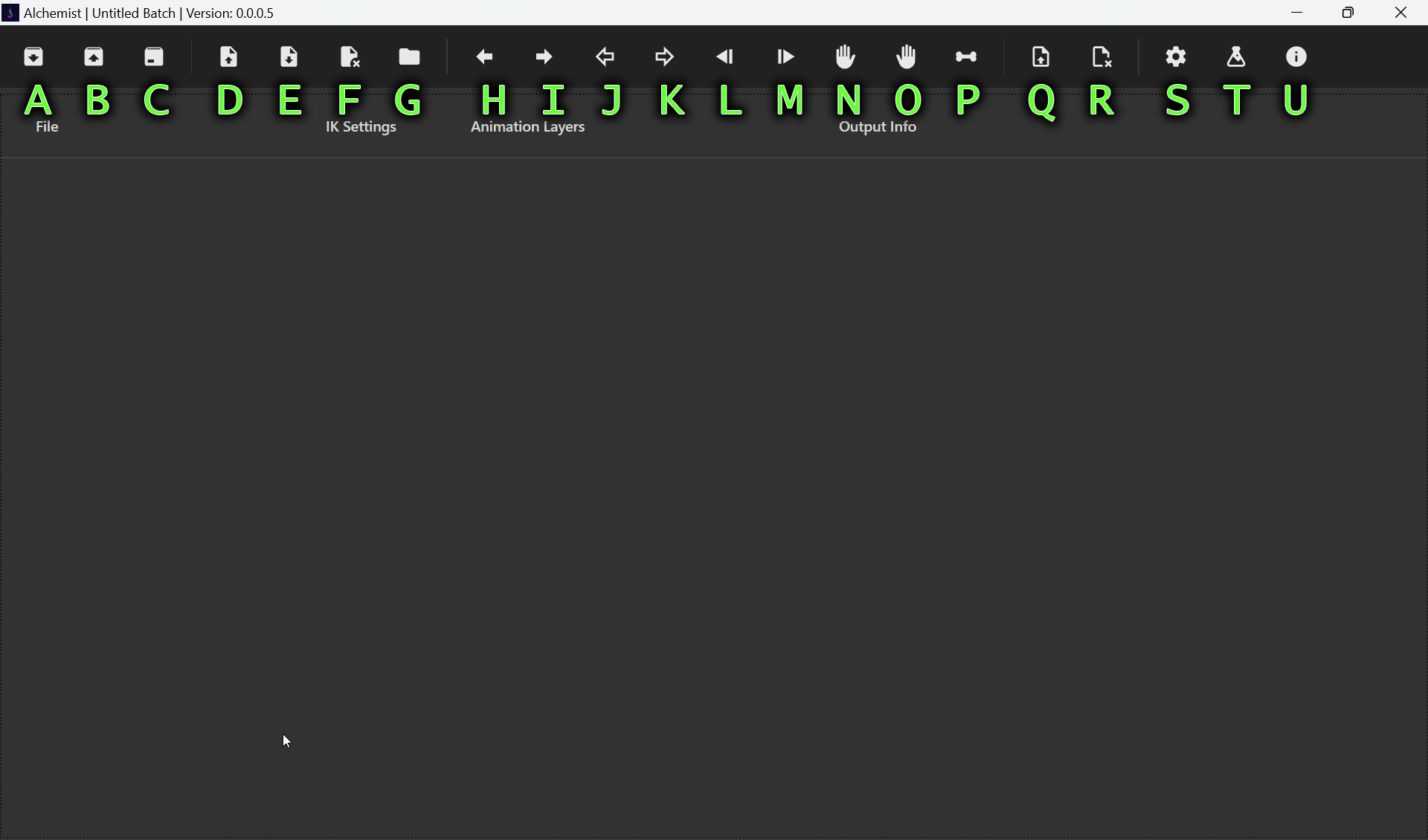
- A: Opens a project
- B: Saves the current project
- C: Saves the current project to a new file
- D: Opens animations and adds them to the list
- E: Exports and processes all animations in the list
- F: Removes selected animations from the list
- G: Sets the output folder for the selected animations
- H: Enables left hand ik/pose for the selected animations
- I: Enables right hand ik/pose for the selected animations
- J: Disables left hand ik/pose for the selected animations
- K: Disables right hand ik/pose for the selected animations
- L: Adds a prefix to the output names of the selected animations
- M: Adds a suffix to the output names of the selected animations
- N: Sets the left hand pose for the selected animations
- O: Sets the right hand pose for the selected animations
- P: Sets the skeleton file for the selected animations
- Q: Adds layers to the selected animations
- R: Deletes selected layers
- S: Opens settings windows
- T: Opens experimental settings window
- U: Opens about window
Feedback
Was this page helpful?
Glad to hear it. Please tell us how we can improve.
Sorry to hear that. Please tell us how we can improve.